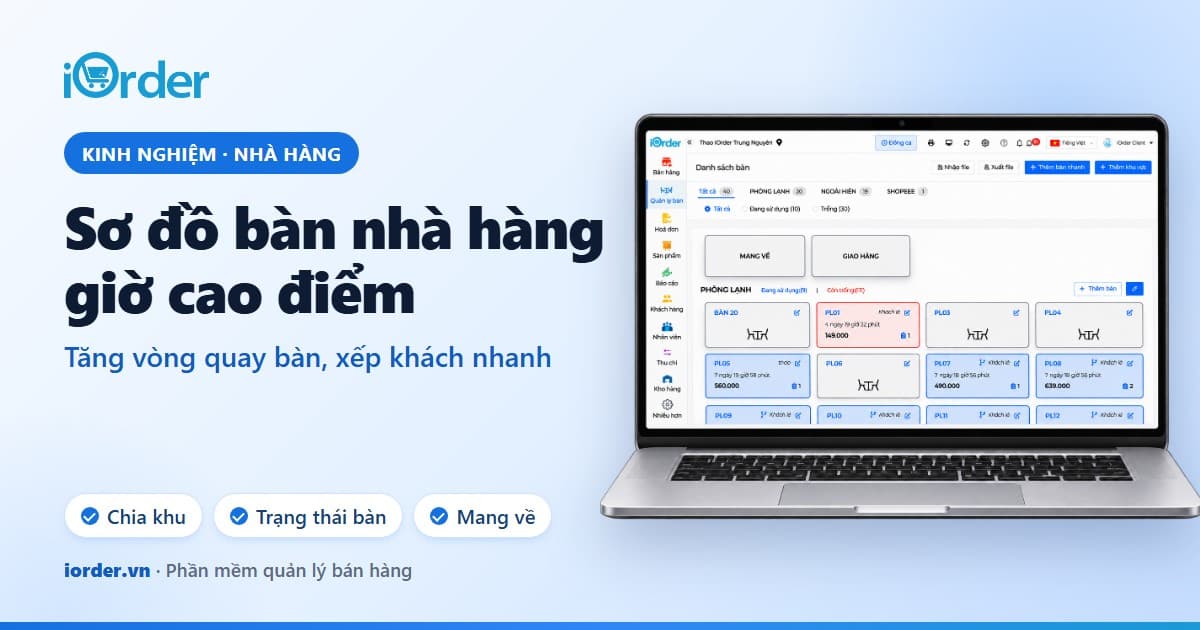
A clear restaurant table map helps staff see which tables are occupied and which tables are empty, instead of having to go around the restaurant to check. During peak hours, the few minutes saved in each customer queue add up to more customers served during the session.
What is table turnover and why does it matter?
Table turnover is the number of customers a table serves in a period of time. The shop has a fixed number of tables, so increasing rotation is the most natural way to increase revenue without expanding the premises. This is only achieved when customers do not have to wait for a table even though the table is empty, and the dishes are served quickly so that customers do not sit for too long.
Divide the zones on the restaurant table plan clearly
Divide the shop into areas such as ground floor, upper floor, outdoor or private rooms, and assign each area to a group of employees. When the table map on the software is divided exactly like that, the cashier and the waiter see the same picture: which section is full, which section has room left.
Give the table a short, consistent name (eg A01, B05) and stick the correct number on the actual table
Each area has a person responsible for seating guests and clearing tables
Large tables for large groups, small tables for individual customers so as not to waste seats
Monitor table status in real time
A good diagram shows whether the table is being served, has an order, is waiting to be paid or is empty. When the customer finishes paying, the table status changes immediately, the cleaning staff can see it and the counter can arrange new customers as soon as possible. Information on how long guests have been seated helps managers know which tables need attention.
Quickly handle common situations
Merge tables and separate tables
Large groups of guests often join multiple tables together, then divide the bill when paying. Merging and separating tables right on the diagram helps staff not have to record orders from the beginning and avoid confusion.
When guests want to change seats
It's normal for guests to want to change seats midway. Please agree with the staff on how to proceed: who notifies the kitchen, who updates the diagram, so that the dish is not mistakenly brought to the old table.
Customers take home and deliver
Takeout and delivery orders do not use tables, but they should still be managed in the same system to avoid confusion with dine-in orders. Separate order options help staff switch quickly between service types.
Combine with stove and report
The table plan is only effective when the order is sent to the kitchen immediately and the manager reports to know which areas and hours the restaurant is most crowded. See also how to divide zones and monitor internal status Table Management guide and ways to shorten the waiting time for food in the article 5 ways to reduce waiting time for food during peak hours.
Get started with iOrder
iOrder is POS management software for computers, POS terminals, and phones. It combines sales, table management, inventory, invoices, receipts and expenses, shift closing, and reporting in one system. You can view Introducing iOrder POS management software or leave information on the page Contact Let the iOrder team advise you on how to apply the table map to your store model.